🌟 Join us on Discord! Chat, share, and get inspired — become part of the ArtGeneration.co community
Coins and limits
Everything the service does costs coins: an image, a clip, a voice-over, a chat reply, extracting a prompt from a picture. Coins are a single currency, so you never have to count "how much video is left" separately from "how many pictures are left".
How many you have is always visible in the header.
Why there are two numbers
The header shows something like N (+M) — a number, then a second one in
brackets and in a different colour. These are two different wallets:
- the first number is the daily balance. Once a day it can be refreshed to your plan's allowance — not automatically, but with a button (see below);
- the second, in brackets, is the non-expiring balance. Bought as a package or received as a gift, it has no expiry date.
The daily one is spent first, and only when it runs out does the service touch the non-expiring one.
Example. The header shows 600 (+15,000). A work costing 55 coins takes 55
out of the six hundred. Once those are gone, the next one starts eating into
the fifteen thousand. Numbers use the thousands separators of your interface
language.
The second number carries a plus sign and a different colour, so it reads as "how much will be added". It is not: the brackets hold your non-expiring reserve, not an addition to the daily one.
Expensive models are better launched early in the day, while the daily allowance is intact: the non-expiring coins then stay for later, when the daily one runs out.
Both numbers are one button, and it opens the plans window. So "I clicked the balance and plans popped up" is not misplaced advertising — that is what the button is for.
Daily coins have to be claimed
While the coins are unclaimed, the header carries a Claim button. It opens a window headed "Get N coins!" — how much exactly is credited is written in the heading and depends on your plan; the button inside is called "Get".
The chest in the header is a button, and it has two states with different meanings:
- open chest — coins not claimed yet; clicking opens the claim window;
- closed chest with a timer — already claimed; clicking opens the plans window, not the claim window.
After claiming, the button changes its purpose, and that is often taken for pushy advertising or a fault. It isn't: the chest is closed, so that's it for today — and the same button now offers to top up.
After claiming you get "Generations received!" with the line "Best of luck with your work!". Press again the same day and you get "Generations have already been received. New generations will be available the next day."
The daily balance is set, not added. Example: 40 left out of 600, you press "Claim" — and get exactly 600, not 640. The remainder is not added on top. Accumulating above the daily allowance is impossible.
Claim at the start of the day even if you are not going to create anything right now. The non-expiring balance is unaffected, and the daily one will not appear on your balance until you claim it.
The countdown to the next top-up runs to midnight Moscow time for everyone, regardless of the time zone in your profile. When it reaches zero the Claim button comes back on its own — no need to reload the page.
On a phone only the chest icon remains — no label and no timer.
What a generation costs
Every model has its own price, shown next to the create button as "N / gen" — before you launch, not after. The price depends on the model, the chosen resolution and the mode.
Hover the price badge — it breaks down where the sum came from. For images that is the size and the price per piece, for video "seconds × price per second", for voicing the characters. Paid options come as separate lines, and at the very bottom sits the prompt length counter.
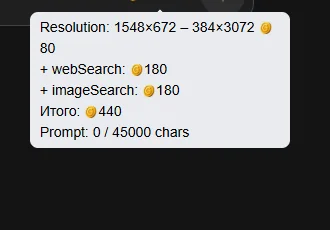
The main way to save: the price is tied to a group of sizes, not to an exact size. The hint shows a "from — to" range, and every size inside it costs the same. Nudged the slider and the price did not change — you stayed in the same group and got more pixels for free.
Clicking the badge opens the model's price table: for images, sizes and prices; for video, the cost per second plus a "Minimum" block (what the shortest clip will cost); for audio, a price per second, per thousand characters or per track. The table describes the model, not your plan — it is the same for everyone, including people who have not signed in.
If a model's price depends on the creativity mode, a mode table is shown instead of the size one, cheapest first. And if there is no mode table at all, that is your answer: on this model the mode does not affect the price — take the highest one without worrying.
The counting differs by what you create: images per image, video per second, chat per thousand tokens, voicing per character. More in Generator.
Where to see your allowance and what a plan includes
Exact numbers are deliberately not repeated here: they change. Everything current is in the plans window, which opens by clicking your balance.
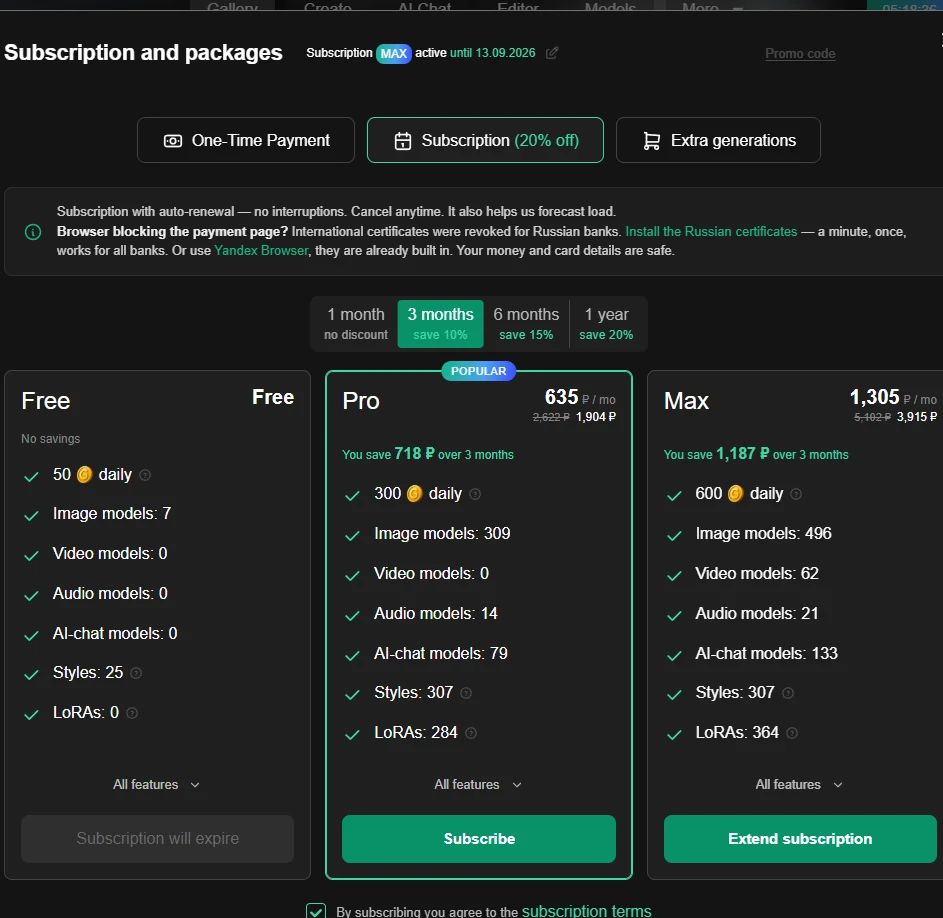
The window itself lists, for every plan: how many coins per day, how many image, video, audio and AI-chat models are available, how many styles and LoRAs. There is also an "All features" button with the full list.
The current figures are always in the plans window. More about paying — Plans and payment.
What happens if a generation fails
The main fear sounds like this: "they charged me and there is no picture". That does not happen.
Coins are not deducted at launch — they are reserved. On success you are charged for what was actually produced: you ordered four images, got three, the fourth is refunded.
If it didn't work, the coins come back. Every generation starts through a reservation, so a failure returns what was reserved.
The refund goes back to exactly the same wallet it came from: what was taken from the daily balance returns to the daily balance, and the same for the non-expiring one. Daily coins do not turn into non-expiring ones or vice versa.
How much is currently reserved for a running generation is not shown anywhere.
Out of coins
The insufficient-coins notice comes in two different states, with different ways out:
- Daily coins not claimed yet — the heading "Not enough", the text "Need N, you have M" and an offer to claim the free daily ones. The "Claim daily" button opens the claim window.
- Daily coins already claimed — same beginning, then "Top up your balance to continue". The "Top up balance" button opens the plans window straight on the packages tab, not on subscriptions.
The banner deliberately does not close on a click in its body — only by the cross. That is protection against dismissing it by accident: the message with the "need / have" figures is worth reading.
There are two ways to top up: move to a higher plan — or buy a package of non-expiring coins without changing the plan.
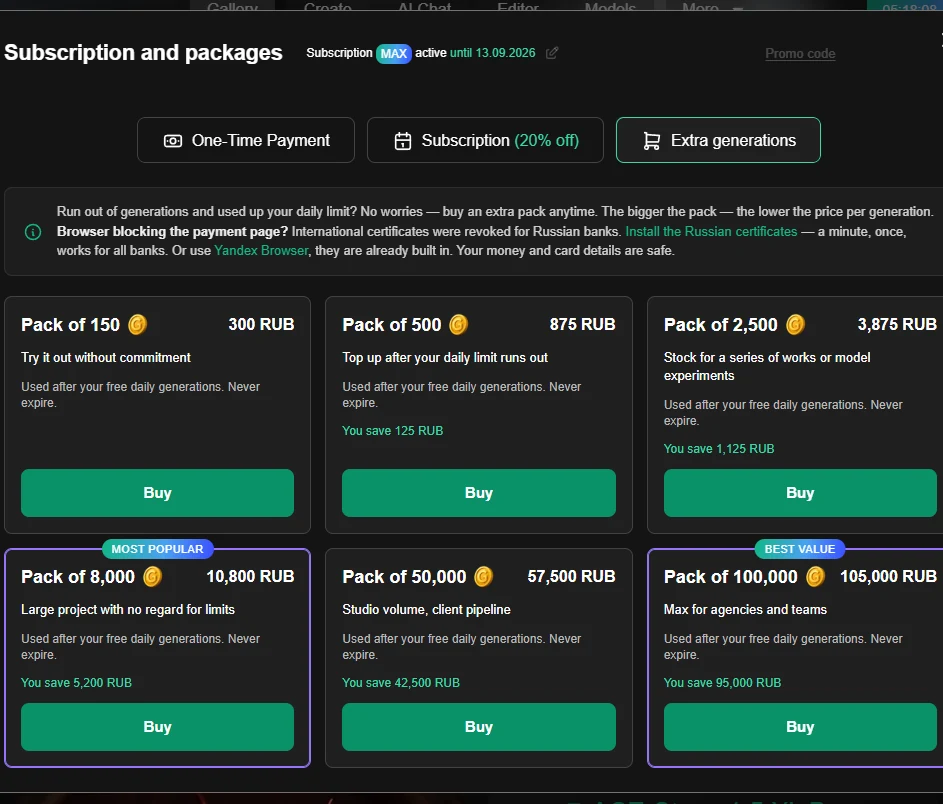
Every package has the scenario it was built for written on it: from "have a look, poke around, try it" and "finish the art when the daily limit ran out" to "studio volume, a flow of clients". Go by the caption, not only by the price — that is what it is there for.
A package and a subscription solve different problems. A subscription raises your daily allowance and unlocks features. A package unlocks nothing — it just gives you a reserve that does not expire and stacks with the daily one. If you hit the limit only occasionally, a package is cheaper than changing plans, and it can be bought in advance.
Too many generations at once
Generations run in a queue. If you launch several works in a row you may get "The parallel generations limit has been reached". Nothing is broken: wait for one of the running ones to finish and try again.
Paid plans allow more at once and start them faster; what exactly your plan includes is in the plans window.
Where to go next
- I want to know what eats the most — Generator.
- I want to change plan or buy a package — Plans and payment.
- Coins are not credited or were spent oddly — When something doesn't work.
