🌟 Join us on Discord! Chat, share, and get inspired — become part of the ArtGeneration.co community
Plans and payment
The plans window opens by clicking your balance in the header. Plans differ from one another in the daily coin allowance, the set of available models, how many pictures one run makes, private mode, access to 18+, the ability to change your name and the absence of ads — while the actual numbers always stand in the window itself.
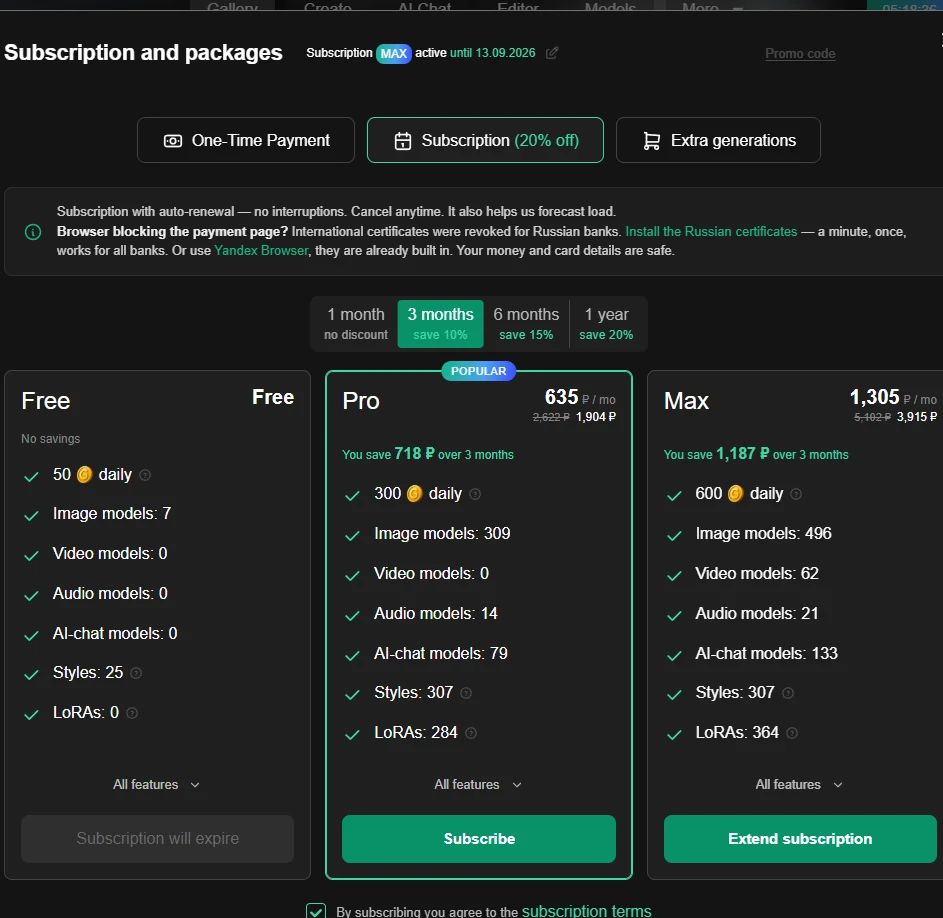
Three tabs and how they differ
- One-time payment — a single payment for a chosen period with no automatic charges; when the period ends you pay for the next one by hand;
- Subscription — with auto-renewal, no interruptions, cancel at any time. The auto-renewal discount is shown right in the tab heading;
- Additional generations — coin packages: "out of generations and the daily limit already spent?" The bigger the package, the better the value per generation.
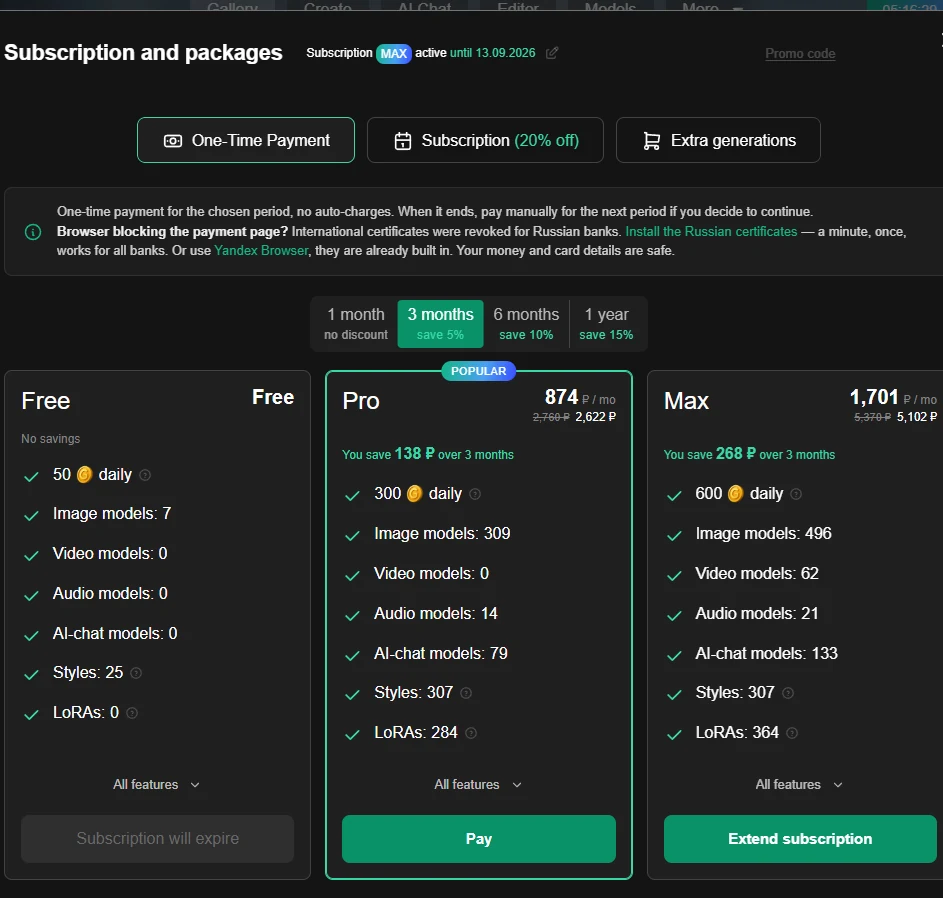
The free plan is shown as a card on both subscription tabs — not for sale but for comparison. Every plan has an "All features" button with the full list.
The period switch and the length discount
Above the plan cards sits a period switch, and each period has its own discount written under it; the shortest one says "no discount". Periods run from short to long, and the list is live: add a new one and it shows up. The "Additional generations" tab has no switch at all — packages are not tied to a period.
A period's discount is the largest among the plans for that period, not yours. The switch shows the best offer of the period; for a particular plan the discount can be smaller. So the safer comparison is not the price and not the percentage but the price per month — divide the sum by the number of months and it is immediately clear which wins.
One-time payment and subscription have different discounts per period: the subscription tab shows one set, the one-time tab noticeably smaller ones. Compare not just the price but the tab.
Coin packages
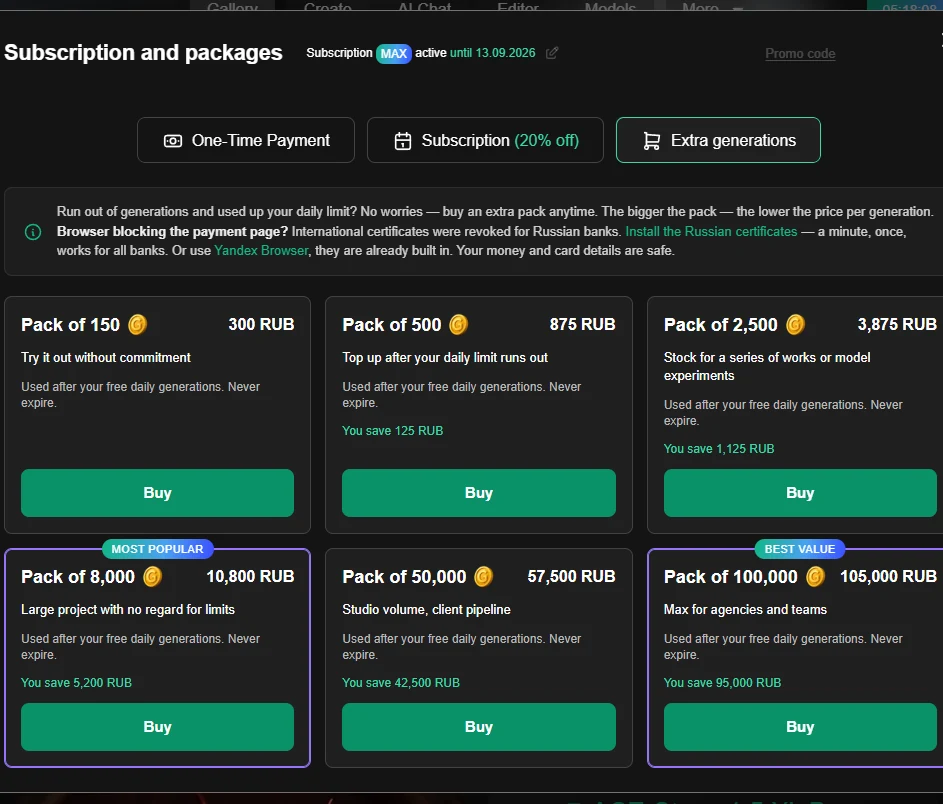
Every package has the scenario it was built for written on it: from "have a look, poke around, try it" to "studio volume, a flow of clients".
A saving is written under each package — and it is not calculated the way you would think. It is not a discount off a former price but the benefit compared with buying the same number of coins in the smallest package. So the caption answers "how much better off am I buying in bulk", and comparing packages by it is more useful than comparing prices.
A package and a subscription solve different problems. A subscription raises your daily allowance and unlocks features. A package unlocks nothing — it gives you a reserve that does not expire. More about the two wallets — Coins and limits.
Changing your plan
Before the change the service shows a preview: what changes, how much to pay and from which date. Plans do not change blindly.
| What you do | Pay now | When it takes effect | What happens to the remainder |
|---|---|---|---|
| Take a paid plan from the free one | full price | immediately | there is no remainder |
| Extend the same plan | full price | immediately | the term is added to the current one |
| Move to a more expensive plan | full price of the new one | immediately | the remainder turns into days of the new plan |
| Move to a cheaper plan | nothing | at the end of the paid period | the current one runs to the end |
| Give up the paid plan | nothing | at the end of the paid period | the current one runs to the end |
Moving up does not waste your paid days — they are recalculated into days of the new plan. So moving up is better value mid-period than waiting for it to end.
And moving down never takes away what is already paid: it is simply scheduled for the end date.
The window's heading changes with the scenario — "Subscribe to …", "Switch to …", "Extend …" or "Cancel subscription" — and the button at the bottom reads "Proceed to payment" where money is due and "Confirm" where it is not.
The window spells out what happens next: moving up, it says the subscription will be active until a date, bonus days from the remainder of the current plan included; moving down, that until that date you keep using the current plan without limits.
When downgrading, a block "After the switch you will lose:" appears with a list of what goes away — read it before confirming.
A scheduled change can be cancelled. The plan card gets a "Switch scheduled …" mark and a "Cancel switch" button, while the current one shows "Active until …".
Note: there can be only one pending change. Trying to schedule a second one is refused with a request to wait until the current plan ends. The way out is to cancel the scheduled one and set it up again.
If the calculation could not be obtained, it says so — without a preview the change does not go through.
Cancelling auto-renewal
Cancelled on the payments page — and the easiest way there is from the plans window itself: at the top, next to the "Subscription … active until …" line, there is a pencil icon, "Manage subscription and payment methods". There is deliberately no "Cancel" button in the window, and that is the first thing people trip over.
On cancelling, a window opens headed "Your creativity matters to us!", with a list of what the subscription gives and two buttons.
This is a retention window, not a confirmation with consequences. Cancelling happens via the left button — "Cancel subscription"; the right one, "Keep the subscription and carry on creating", just closes the window. Nothing burns: the subscription runs out its paid term.
In its list of features the window promises access to 18+ with no conditions. In reality a paid plan is not enough: you also need the "Show NSFW content" checkbox in profile settings — Profile and settings.
Right after cancelling you get a confirmation: "Subscription auto-renewal has been cancelled. You can keep using the subscription features until the end of its term".
"I cancelled, but nowhere does it say I did." The subscription line is always shown the same way — "subscription active until …" — and after cancelling it does not change. There is no separate "the subscription will end on …" line, and there will not be one.
The reason: the "active until" date is the end date. You saw the confirmation once, in the window right after cancelling. Pressing cancel again returns "Auto-renewal has already been cancelled" — a normal answer, not an error.
Where the confirmation is visible after all: the free plan card in the plans window gets a mark that you will return to it. A scheduled move to another paid plan, on the other hand, is shown as its own line — the difference is not obvious. On the free plan there is no subscription line at all, and that is not a fault.
The subscription line shows three different things
One and the same line at the top of the window covers three states: the current subscription with its end date; the next one — when a switch is already paid for, and then you see its name and the dates it runs between; and a temporary upgrade from a promo code. The last one looks exactly the same, but it is not a scheduled plan — it is a return to your previous plan when the boost ends, and it cannot be cancelled.
Promo codes
In the plans window the promo code is not a field but a faint "Promo code" link at the top: until you click it, there is no input at all. That is why people fail to find it. Clicking turns the link into an "Enter promo" field. A guest does not see the link at all — promo codes are for signed-in users.

A promo code can give two kinds of benefit, and they combine: coins — which land in the non-expiring balance — and/or a subscription for a period.
If you already have a paid subscription, a promo code does not extend it. It switches on a temporary upgrade to the code's plan and refreshes the daily balance right away. On the free plan the same code is granted as an ordinary subscription.
The difference is not obvious, and without an explanation it looks like "the promo code was wasted".
The main thing about a promo code: once accepted, it recalculates the prices right in the plans window, before payment. The discount is immediately visible on the plan and package cards — which means the code should be entered before picking a plan, not at the last step.
It applies with a tick or the Enter key; there is no separate "Apply" button. On success the field turns green with the campaign description below it, on refusal red. The cross clears the code and brings the usual prices back.
A code can be refused for four different reasons, and they mean different things:
| What the message is about | What it actually is |
|---|---|
| the code has already been applied | you have used this code; it will not work a second time |
| the activation limit is exhausted | others took it; waiting is pointless, you need a different code |
| the code has expired | the campaign has ended |
| the code does not exist or is unavailable | a typo in the code — or it is switched off, and then support is needed |
Support is only worth writing to about the last case. The first three are not a fault: one is the code itself, another is everyone else having used it up, the third is a campaign that ended.
If you already hold a paid subscription and the code gives the same or a lower plan — save it. You will not feel the upgrade and it will not extend the term; better to apply it once the current subscription ends.
Payment methods
Saved methods live in a collapsible block on the payments page: cards in a row that scrolls sideways, with a "+" tile at the end for a new one. They are labelled briefly — "Card", "SBP", "SberPay", "YooMoney" — and a card shows the last four digits and a bin.
The main method is chosen by clicking the card itself — there is no separate "make primary" button, and people look for one in vain. The primary one has a green border with a tick.
Why a card won't delete. The bin disappears on the last card if you have an active auto-renewing subscription. Cancel auto-renewal first, and the method can then be removed. With no subscription, every method can be deleted.
When payment won't go through
The plans window warns about this under every tab, and the text is worth reading:
"Browser blocking the payment page? International certificates were revoked for Russian banks. Install the Russian certificates — a minute, once, works for all banks. Or use Yandex Browser, they are already built in. Your money and card details are safe."
Two phrases in that text are links: "Install the Russian certificates" leads to gosuslugi.ru/crt, and "Yandex Browser" to browser.yandex.ru.
Four windows after payment
| Window | What it means |
|---|---|
| "Payment successful" | everything is credited |
| "Payment in progress" | the money has left, the plan has not switched yet |
| "Error" | the payment did not go through |
| "You are not signed in" | you came back to a browser window where you are not signed in |
"Payment in progress" is a normal intermediate state, not a fault. The money is taken, the plan will update shortly: wait and refresh the page. Do not pay again — this window is the single most common reason people write to support a minute after paying.
The fourth case is common too: the payment finished in another browser window or on a phone where you are not signed in. Go back to the window where you started, or sign in again — the payment is not lost.
If a payment is refused for another reason, the service names it outright: the plan is not on sale, you already have a subscription to it, or another plan change is already scheduled.
Payment and coin history
On the payments page this section is called "Payment history" — one table with six columns: Product · Details · Date · Status · Amount · Payment info. On a narrow screen it scrolls sideways, the right-hand columns are not lost.
If there have been no payments yet, a "No payments found" placeholder with a link to packages and subscriptions stands in place of the table.
Higher up on the same page live the "Payment methods" block and the "Subscription … active until …" line — the very one that does not change after you cancel auto-renewal.
This table mixes two different things: payments and coin movements. Hence the puzzlement of "why is there a line about a generation in my payment history" — it is not a payment but a coin charge. Telling them apart is easy: payments have an amount in currency and payment info, coin movements do not.
What you will find in the list: charges for creating works, the daily top-up by plan, activation and deactivation of a package, the start and end of a subscription, a credit from support, a promo code activation, following a link from an email, a referral reward and a reward reversal.
A reward reversal is the only "minus" line, and it scares people for nothing: the reward came back because the invited person's payment did not go through or was refunded.
Invite friends
Everyone has a permanent link. A friend gets a bonus on registration, you get a reward from their purchases.
The page has two tabs: Link (with the link and share buttons; the message text is already written for you) and Statistics. At the bottom of the page there is its own FAQ — when a reward is credited, whether you can be both a referral and a partner, whether a reward expires, and how to collect what you earned. Go there for the current terms: they are configurable and can change.
"Invited" and "Active referrals" are different numbers, and this is the main question of the page. A registration through your link is not a reward by itself: an invited person only reaches the second counter after meeting the conditions described on that same page. So "I invited five people and have no rewards" is usually not a fault.
Besides the two counters, the "Statistics" tab has a "Your rewards" block (Earned · Pending · Paid out) and "Latest credits" with a status icon on each line. A reward is not always coins — it can include subscription days.
The answer to "my friend paid and I have nothing" is in that same FAQ: a reward does not arrive instantly, it needs confirmation. The note under the list of credits says exactly that — rewards are credited automatically once confirmed.
The link carries a language segment: share from the English version of the site and you send an English link. For a Russian-speaking friend, take the link from the Russian version.
Reward statuses
Pending · Confirming · Approved · Credited · Reversed · Rejected.
"Credited" is the final good state. "Reversed" means the reward was taken back, usually because the friend's payment did not go through; "Rejected" means the reward was not confirmed.
The same history also shows what each credit was for: "Referral reward", "Welcome bonus", "Reward clawback", and for partners — "Partner reward" and "Partner payout".
Partnership
The referral and partner programmes are mutually exclusive. A partner does not see the referral dashboard at all — instead there is a note and a button leading to the partner dashboard. Partners earn cash.
Old referral credits stay in the history — they should, and that is not a contradiction.
You become a partner by application, there is no automatic approval: you state your traffic channels (from a ready list — YouTube, Telegram, Instagram, TikTok, VKontakte, a blog or site, advertising, other), the size of your audience, links, a Telegram contact and how you would like to be paid, and the application is then reviewed by hand. It has three states: under review, rejected (you may apply again) and suspended. An approved partner does not need to apply a second time.
The programme page can also be in a "the partner programme is temporarily unavailable" state — with neither an application form nor a dashboard on it. That is not a sign-in fault and not a block on your account: the programme is closed for the time being, come back later.
What happens when the subscription ends
The plan returns to free, and the non-expiring coins stay — they have no expiry. What goes away are the paid plan's features: some models, private mode, PNG and JPG formats, the works archive and the rest of the "All features" list.
The daily balance drops immediately, it does not live out the day. At the moment the subscription ends it is set to the free norm — if the counter was high, it disappears there and then.
Hence a practical tip: claim and spend your daily coins just before the subscription ends. After the switch they are recalculated at the free rate.
Showing adult content switches itself off. The setting is dropped together with the subscription, and after renewing you will have to switch it back on in profile settings.
Your works are not going anywhere: they are not deleted, private ones do not become public, bookmarks and favourites remain. But if some of them are private, it is worth deciding in advance what to do with them: privacy can only be changed by the owner on a paid plan — see Your works.
Where to go next
- Understand what your spending consists of — Coins and limits.
- See what a plan includes — the plans window, "All features" button.
- A payment won't go through or coins were not credited — When something doesn't work.
